Welcome back
Sign in with Strava
Strava is how your challenge gets tracked. Connect once, and every run, ride, walk, or workout counts toward your streak — automatically.
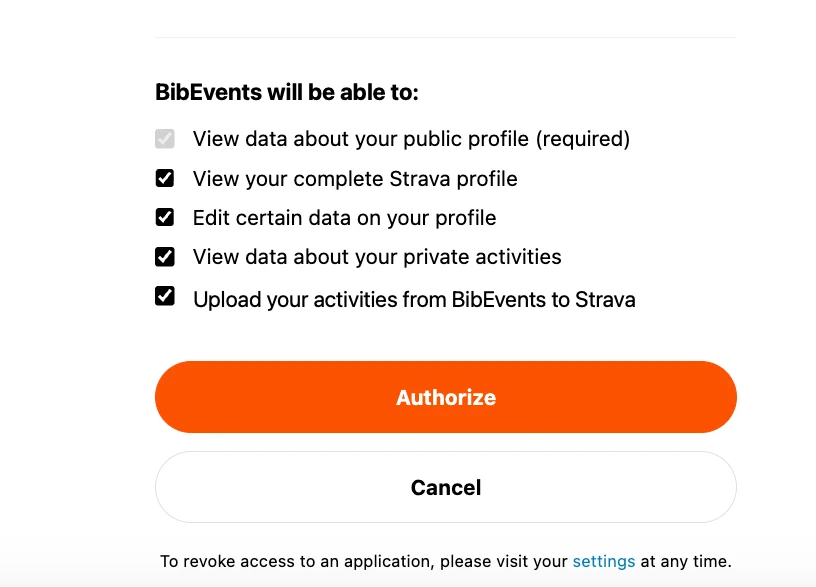
Strava will show a permission screen. Leave every box ticked — an unchecked box means activities may not sync and your streak can show missed days.
What Strava access does for you
- Track your daily streak automatically. Every activity you record on Strava counts toward your challenge — no screenshots, no manual uploads.
- Stamp your progress on each activity. We add a stats line to your activity description, like "Day 33/100 • BibEvents Consistency Challenge".
- Power your daily progress reports. Your 6 AM tracker card and nightly report on WhatsApp are built from your synced Strava data.
Keep every permission box checked
When Strava asks for your approval, it shows its own permission checkboxes. The wording is Strava's — here is exactly how BibEvents uses each one.
“View data about your private activities”
If you save a workout as private, it still counts toward your daily streak. Without this, private activities are invisible to us and show up as missed days.
“Edit certain data on your profile”
Used only to add the challenge stats block to your activity description. We never change your title, stats, or anything else.
“Upload your activities from BibEvents to Strava”
Powers an upcoming feature to record activities on BibEvents and sync them to Strava. We never upload anything without your action.
“View your complete Strava profile”
Lets us show your name and profile photo on your dashboard and progress cards.
If a box is unchecked, your activities may not sync and your streak can show missed days — please keep all boxes checked before tapping Authorize.
Strava will show this permission box — keep all the boxes checked, then tap Authorize.
Ready to continue?
You'll be redirected to Strava to confirm your account, then brought straight back. If you already approved BibEvents, you won't be asked to authorize again.
Sign in with StravaBy signing in you agree to our Terms & Conditions and Privacy Policy.
Your data is used only for your challenge experience. You can revoke access anytime from your Strava settings — see how to disconnect.
Use a different Strava account? Switch Strava account — sign out of Strava in your browser first, then use that link.
New here? Pick a challenge to get started.